Buy
hard drive jumpers online at reasonable prices! Order
online now! Click
Here to order now!
Good links to the sites you need to configure your hard
drive jumpers.
Jumper pins
(points to be connected by the jumper) are arranged in
groups called jumper blocks, each group having at least
one pair of contact points. An appropriately sized
conductive sleeve called a jumper, or more technically, a
jumper shunt, is slipped over the pins to complete the
circuit.
Overclock
Mac (optimize) your Apple Power Mac
Beige G3 system,
Blue
& White G3's
&
Sawtooth G4's,
Digital
Audio G4,
QuickSilver
G4 or
iMac
G3's
all in one place!
Now you can get
the jumpers you need without having to pay an arm and a
leg for shipping and get help finding out how you are
supposed to configure your equipment in one easy to use
place. Jumpers are sometimes called shunts.
 Click
Here to order now!
Click
Here to order now!
RESOURCES FOR
FINDING YOUR SATA HARD DRIVE JUMPER
CONFIGURATION
The new SATA
drives don't require any jumper setting changes on your
Macintosh (MOST OF THE TIME). If you are on an
iMac G5 and install a new SATA drive you will need to
slow down the drive by adding a jumper. If you are using
a drive from an iMac G5 and putting it in a later machine
you need to remove the jumper. Your drive should be
recognized by the disk utility and allow you to format
it. If it doesn't suspect jumper settings. The regular
tower Power Mac G5 systems had the faster bus. PC's may
require it depending on your motherboard.
Why
you should check a SATA drive's jumper settings -
YouTube.
Some of the
early iMacs and MacBooks, MacBook Pro's may have trouble
talking to the new 6GB drives that are now available. If
your unit has the 1.5GBPS drive bus you may want to
install the jumper. Another article I found useful was
from Accelerate
Your Mac.
It has a diagram for setting the Seagate drives down. On
Western Digital jumpering pins 5 and 6 (Opti 1) will
limit the drive to 1.5GBPS.
RESOURCES FOR
FINDING YOUR IDE HARD DRIVE JUMPER
CONFIGURATION
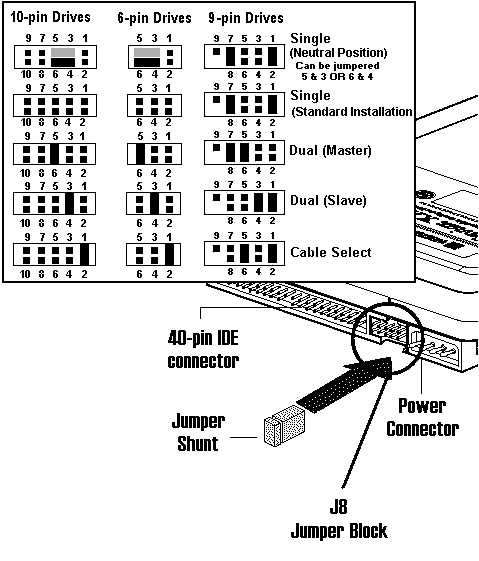
They call IDE
drives ATA and more recently PATA. It is for our intents
and purpose all the same. Do scrutinize the drive itself.
Many times the settings chart is right on the drive.
Knowing the settings is important for to easily install
hard drive they are required.
How to
configure your drive jumper settings for:
Hitachi/IBM
- Hitachi bought IBM's Hard Drive Division.
This
link is to their drive setup
site.
The jumper table is on the end of your hard drive.
Seagate/Maxtor/Quantum
- the Seagate
site is crap now. Use my Seagate/Maxtor/Quantum
Drive Table.
Western
Digital -
http://support.wdc.com/
-
look on the circuitboard near the jumper position or
click
here for the universal
chart..
Samsung
-
had to do their own thing so pay attention: drive
configurations Samsung
Chart.
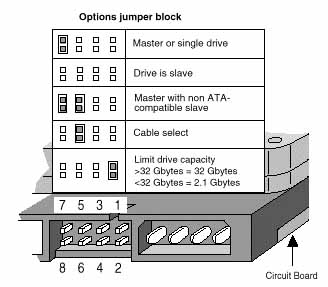
The chart on the drive makes no sense. I don't think much
of these drives by the way. They have a high failure
rate. They went out of their way to show you how to limit
your drive to 32GB for what reason I cannot
imagine.
RESOURCES FOR
FINDING YOUR SCSI HARD DRIVE JUMPER
CONFIGURATION
SCSI
JUMPERS - most SCSI drives use the small size
jumpers. This is a link to Seagate/Maxtor/Quantum
site.
From there you can find the jumper settings for your
drive Click here for drive hard jumper maxtor
setting
Maxtor/Quantum
- http://www.maxtor.com/home-en-us.html
SCSI drives use
jumpers for several functions. The main reason most
people change the jumpers on a SCSI drive is to give it a
different SCSI ID. There are usually 3 locations and on
the Quantum for example they are labeled A2, A1, and A0.
Default is generally no jumpers which makes the drive 0.
By adding jumpers to different positions you can number
the drives anywhere from 0 to 7. The main thing is to
make sure that the number you make the drive is different
than any other device on the chain. For example a typical
installation would be a base drive with the number of 0,
a CD drive with the number of 3, a zip drive with a
number of 4, and a scanner with a number of 7. If you
were to add an additional drive to this chain it would
have to be numbered 2,5, or 6.
The other
reason to jumper a drive is for termination. It seems
systems like to know where the beginning and ending of
the chain is. To accomplish this the first device on the
chain generally should be terminated as well as the last
device. See the notes on your system for specifics. I
like to have my scanner as the last device in the chain
and I always terminate it. Want to know more about
termination? Try http://www.scsita.org
and look up termination.
Startech has a
SCSI School which is a great place to learn about all the
flavors of SCSI http://www.startech.com/scsischool/
IDE/ATA/PATA
DRIVE JUMPERS
- all
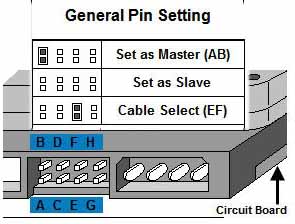
IDE/ATA/PATA drives use the large size jumpers.
IDE/ATA
drives generally have 3 or 4 jumper positions. If you
have two drives on a bus you must configure the drives in
a master/slave configuration which may require you add a
jumper to one drive or the other. See your drive
instructions or try the appropriate site listed in the
links.
SPECIAL
NOTE: ON
Power Macintosh G4 systems produced after 2002 which
includes late model QuickSilver G4's, Mirror Drive Door,
iMac G4's, Mac Mini"s, iBooks, Powerbooks having Boot ROM
Versions 4.33 or later you should use
CABLE SELECT on all drives including
opticals.
This
includes all G5 model opticals as well. The G4 units do
not have the 132GB hard drive limitation and can use the
larger IDE drives. Do remember though that if you plan to
boot info OS9 on units that are capable, the maximum
partition size is 190 GB.
We have
recently added a new site about optimizing your G4
Sawtooth System! Here is my page on optimizing (clocking
up) Sawtooth
G4 Macs including
duals, complete with chart. Also visit power-mac-g4.com
Optimize
your G4, Click here for:
Why
DriveJumper.com?
In a word you
can't find these anywhere anymore and if you do they want
you to buy $50 minimum or pay through the nose for
shipping.
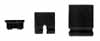
They are
sometimes called female jumper connectors, 2 pin shunt,
pcb jumpers connectors, electrical jumper connectors or
laminated copper shunts. I just call them jumpers.
I started this
service for those of you in this position. Not only do I
have the links to get the information for setting up your
drives all in one place I also added the best sites with
overclocking information.
I usually drop
them when working and my wife vacuums them up when I am
not looking.
I also added
some drives to these systems and on some I had to change
the SCSI ID's and termination and on the IDE drives I had
to set up Master Slave configuration. Again I needed
jumpers only this time a different size. I had a heck of
a time finding the information on setting up the drives.
When we
configure G3 Systems we sometimes overclock (speed up or
optimize) the processor on these unit easily. Or so I
thought. Some of the configurations require 6 jumpers. I
couldn't find the small size jumpers anywhere. Radio
Shack didn't have them in stock. I finally found a source
that would sell me in 100 lots but I had to make a
minimum order and pay shipping just so I could get 5
extra jumpers. The drive hard jumper setting was
sometimes hard to find.
Now
you can get the jumpers you need without having to pay an
arm and a leg for shipping and get help finding out how
you are supposed to configure your equipment in one easy
to use place.
New SHORTY
Size Added!
We now sell
three sizes of jumpers. After buying some new SCSI drives
I found I needed a low profile jumper for them. The small
and the large (gold plated small, tin plated large) come
in a package of 6 for a fair price and no tax except in
Oklahoma. They are $1.99 your choice of sizes. The
new SHORTY size we sell 4 in a package for $1.99. We
include shipping in the price (we mail your order first
class). If you aren't sure what size you need order the
combo pack which includes 6 each small and larger for
$2.99. The SHORTY jumpers we only sell separately
and you will know if you need these since they are so
small and SHORT. Email
for
larger quantities We take VISA, MASTERCARD, AMEX,
DISCOVER securely via http://resale.headgap.com
Click
Here to order now!
RESOURCES
FOR OVERCLOCKING YOUR MAC - Optimize!
OPTIMIZE
(OVERCLOCK) YOUR G3
PowerMac
- another reason to need a whole bunch of jumpers! These
use the small size jumpers.
Here is my page
on optimizing (clocking up) Beige
G3 Macs complete
with chart.
Here is my page on optimizing (clocking up)
B&W
G3 Macs complete
with chart.
Here is my page on optimizing (clocking up)
iMac
G3's
complete with chart.
http://www.xlr8yourmac.com/G3-ZONE/yosemite/OC.html
-
Specifics on B&W Macs
http://www.xlr8yourmac.com/G3-ZONE/
-
XLR8's G3 Zone has more upgrade information along with a
database of folks who have reported their overclocking
results.
OPTIMIZE
(OVERCLOCK) YOUR G4 PowerMac
Here is my page
on optimizing (clocking up) Sawtooth
G4 Macs complete
with chart.
Power-Mac-G4.com
- online resources for G4 users
PowerMac-G4.com
- help for G4 users
PowerMac-G5.com
- help for G5 users
Disclaimer/Warning:
This information is for reference only - not an
endorsement of overclocking. Modifications like this will
void your warranty and may result in failures and/or data
loss. I overclock everything but I also tear off the tags
on my mattresses.
Bob, why don't
you sell or recommend the new SSD type drives - now we
do!
Well if you
haven't noticed they are still too damned expensive for
my pocket. That being said we have started installing
Seagates
NEW Solid State Hybrid Drives
on a few of our frequent customers custom system
builds.
Seagates
NEW FireCuda Solid State Hybrid Drives offer the best of
both worlds
If you haven't
see these they offer the best of both worlds. A good size
SSHD is built into a conventional size hard drive giving
you SSD performance and regular drive capacities.
Seagate
has 1 Terabyte, 2 Terabyte capacities in a standard 3.5"
full size capacity for both G5's and Mac Pro Towers or
your older G4;s if you have a SATA card installed.
Remember older PPC Macs don't work well with drives above
2.2 Terabytes.
Seagate also
offers 500 GB, 1 TB & 2 TB capacities in the
2.5"
Laptop sizes.
The larger one will not fit in some units since it is the
taller size.
Do remember we
can do our installs (extra fee) that will get you up and
running immediately and we have the G5 mounting screws in
stock.
We do offer
a 120GB adapted Solid State Drive for G4 systems!
Go to
http://headgapstore.com
and click to enter the store. Look for IntDrive
categories.
Solid
State Drives for Your G4!
Cheryn tells me
we are having trouble finding 80 or 120GB refurbished
hard drives for our older Mac customers. There haven't
been new ones available for years. We know you depend on
us to help keep your old gear running efficiently. These
brand new digital solid state drives have no moving parts
making them not only faster but more reliable. We still
think you should keep your system backed up but running
from these super fast brand new drives only make sense.
We haven't carried SSD drives much before but we think
now that the prices are more affordable now is the time.
We found the right kind of adapter that allows you to
configure it for Master, Slave or Cable Select depending
on your needs. That makes these more compatible and
easily configurable with an included jumper. We can set
these up for your system or you can use copy software to
move your old data. Let us know how we can help speed up
your G4 system. I tested these on our servers so you know
they are fast and dependable.

|
Speed
up your G4 • Faster Data Access • No
Moving Parts
INTRODUCTORY
PRICE $99.77
INCLUDES
SHIPPING!
Operator
Headgap tested and approved! Improve
Performance! Now more affordable you can move up
to the latest technology on your G4 and still
run OSX or OS9.2.2 and boot from either. This
2.5" SSD comes with an adapter that features the
ability to be set to Master, Slave or Cable
Select for maximum compatibility. The 120GB Size
is the largest size most G4 can run. FASTER
DATA ACCESS! This speeds up almost
everything you do on your Mac! More reliable
than the old conventional drives, no moving
parts, no noise. We include velcro so it is
simple to mount anywhere that is convenient.
WORKS in ALL G4 Macs and connect to a standard
IDE connector. We preformat these and can
preinstall call for custom configuration.
Reg.$119.77, SPECIAL INTRODUCTORY PRICE
$99.77 includes domestic shipping. See
the G4 Category in the online store.
Boot
9 or X
|
COMMERCIAL MAC
HARD DRIVE RECOVERY
If you have
data that absolutely must be recovered, for Mac HD
recovery we suggest a place called DriveSavers.
Tell them we sent you and get a 10% discount by
giving them the number DS20072. They have a no data,
no charge, policy on single drives. I would get an
estimate. Call them toll free at 1-800-440-1904. To
request an estimate by e-mail, log on to our website at
http://www.drivesavers.com/estimate
Remember
here at Headgap we do what is called level 1 recovery. If
the drive isn't making bad noises and is just not
mounting we can likely get your data back and possibly
simply restore the drive.
HARD
DRIVE LIMITATIONS:
The G3 and G4
prior to the QuickSilver 2002 model has a limition on
drive size. 132 GB (formats to 128) is the maximum drive
size for units made prior. Practically speaking an 80GB
or 120GB is about all you can find.
NEVER
INSTALL A 160 GB or Larger Drive internally and format it
to a smaller size. This will bite you on the butt,
guaranteed. I don't care if you did get it for a
nickel.-
WARNING:
If you are planning on buying a large-capacity 3.5"
internal hard drives above 132 GB, you need to be aware
of this issue, in case you are not already:
The ATA
controllers in Macs up through the PowerMac G4
Quicksilver 2001 models cannot properly format a drive
larger than 132 GB, and entire drive will not be
recognized. For example, when upgrading a G4 Quicksilver
2001 with a 160 GB hard drive, only 128 GB of storage
will be recognized if using the native ATA controller. We
stock an ATA card that solves this issue but better yet
install a SATA card if you can still locate one.
All ATA133
controllers allow large capacity hard drives to be
formatted for their full capacity, even in systems where
this was not natively possible (Quicksilver 2001 and
earlier). We or course keep the 133 Cards in stock. but
they are no longer being made so the supply is
limited.
If you are
looking for the ultimate and have a few more bucks to
spend search out the new Serial ATA drives and the new
Tempo ATA150 (only available used these days). These are
probably a waste of money for anything but the fastest
hardware though. They do offer convenience.
External
Firewire drives do not always have this limitation but
you should check with the manufacturer before buying a
housing with plans to put in a larger drive. Some el
cheapo housings may not support large drives.
TEST YOUR
CONNECTION SPEED